Cricut grid lines, you either love them or they just kind of get in the way. Turning them off and on is super simple. You may want them on so that you can see your design to scale, or off so that you can screenshot your design for whatever reason.
How turn off and on Cricut grid lines on a computer
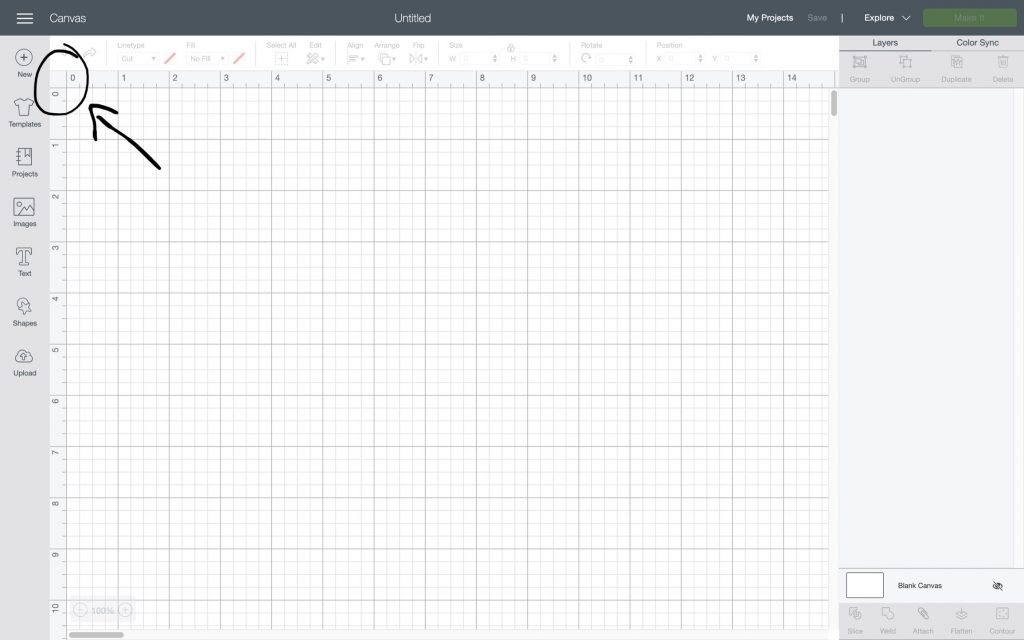
In this little blank square between 0’s just click that empty square. It is strange but it works. To change it back to gridded simply click the blank square again.

How turn off and on Cricut grid lines on an iOS and Android
In your Cricut app, get to your settings from the bottom menu. If you don’t see it you can swipe right until you see the settings icon. Tap it and it will bring up 3 options the second of the 3 is the one that you want titled ‘Grid’ when toggled off the grid disappears and when toggled on they appear.


More Cricut tutorials
I’ve put together a list of helpful Cricut tutorials that walks you through various skills that help you become a better designer and crafter.

If you need some project inspiration check out these Crafting Blanks! Another resource that may come in handy is these SVG Subscription Plans. The subscription plans include thousands of SVGs for a great price. A subscription is the best way to go if you do a ton of crafting. But if that isn’t your cup of tea, check out these Free Commercial Use SVGs. Or these Free Commercial Use Fonts to get the inspiration flowing.
Good Morning Chaos is a participant in the Amazon Services LLC Associates Program and various other affiliate programs, affiliate advertising programs designed to provide means for sites to earn advertising fees by advertising and linking to goodmorningchaos.com